DreamShot - AI Image & Video
- 3.6
- Rating
- 100.00K
- Installs
- Free
- Price

 Analysis by App-foxy
I approached DreamShot - AI Image & Video as a quick creative tool rather than a complete editing suite. Its purpose is clear: help me turn an idea, selfie, or existing visual into something that feels more polished and ready to share. Developed by DooMoon, it sits in the video players and editors category, although its appeal also reaches people who mainly want AI-assisted images. The app is free to install, rated for Everyone, and currently runs from version 0.3.0 on devices using OS 9 or later.
That combination makes it easy to try, but the experience is not as mature as the store summary might lead you to expect. DreamShot has an average rating of 3.0 from around 135 ratings, so I would not present it as a universally dependable creator. I see it more as an accessible experiment for social posts, profile images, visual ideas, and quick transformations. If you want a full timeline editor, precise controls, or a predictable professional workflow, you should keep a conventional editing app nearby.
Starting with an idea instead of a blank canvas
The most useful way to begin with DreamShot is to have a specific outcome in mind. “Make something cool” is too vague for any AI creative tool. I had a better experience when I started with a concrete purpose: a cleaner profile picture, a visual for a short post, or a stylized image that could become the opening frame of a video. That small change in approach matters because AI generation can otherwise produce something attractive but not especially useful.
You May Also Like

 Pandora - Music & Podcasts
Pandora’s Music Is Easy to Start, but Harder to Recover
Pandora’s strength is its low-effort path from a seed to a station. Its weak spot is how much confidence it asks you to place in connection, setup, and quiet recovery.

 8 Ball Pool
 Is Built on Rivalries, Rematches, and Routine
A close look at the rivalries, rematches, shared routines, and unanswered safety questions that turn a quick pool match into a persistent mobile community.

 Samsung Music
’s Quiet Strength Is Playing What You Already Own
Its reach comes less from spectacle than from dependable access to a personal library. That simplicity is both the app’s strongest retention engine and its ceiling.

 AccuWeather: Weather Radar
AccuWeather Review: A Quick, Clear Forecast for Everyday Decisions
For everyday plans, the best forecast is the one you can understand quickly. AccuWeather makes rain timing, radar, and local conditions easy to act on, with a few trade-offs.

 Hill Climb Racing
Why Hill Climb Racing Still Turns Crashes Into One More Run
A tiny car, a bumpy hill and one more upgrade: Hill Climb Racing keeps resurfacing because its simple chaos makes every near-miss feel personal.

 AliExpress - Shopping App
AliExpress Makes Global Shopping Feel Personal, but Shoppers Bear the Risk
AliExpress turns a global marketplace into a pocket-sized discovery engine. Its reach is useful, its shopping loop compelling, and its trade-offs easy to miss.
More From Our News Desk
View All News


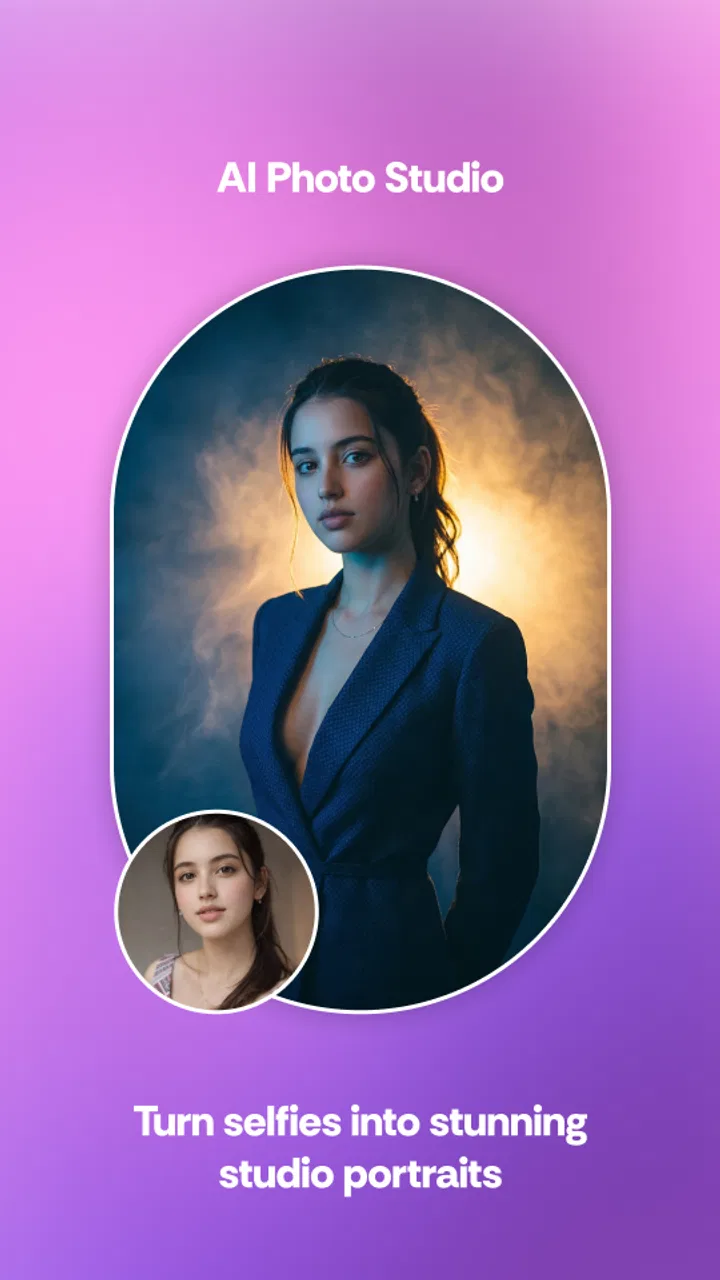
The app’s strongest entry point is the selfie-to-headshot workflow. Someone who needs a more polished image for a professional profile, creator page, messaging account, or portfolio can use it as a fast first attempt instead of arranging a studio session. I would still treat the result as a draft. A generated portrait may improve lighting and presentation, but it is not automatically a faithful representation of how you look in every situation.
I recommend choosing source material carefully before generating anything. A sharply focused selfie with a clear face gives the app a better starting point than a dark group photo, a heavily filtered picture, or an image where the face is partly covered. This is not a complicated trick, but it is one of the most practical differences between a convincing result and an awkward one. The app can only refine the visual information it receives; it cannot reliably recover details that are missing.
DreamShot is also more suitable for fast visual exploration than for building a carefully branded campaign from the beginning. If I were preparing several posts for a business, I would first decide on the desired colors, framing, and tone outside the app. Then I would use DreamShot to explore a few directions rather than expecting it to maintain a complete visual identity on its own. That approach saves time and reduces disappointment when different generations do not look perfectly consistent.
One detail I would keep in mind is the difference between an image that looks impressive in the app and one that works in its final setting. A dramatic portrait may look good full-screen but crop badly into a circular avatar. A wide composition may lose its subject when used vertically. Before generating, I think about where the result will appear: a profile image, a story, a thumbnail, a message, or a larger post. That decision should guide the source photo and the creative direction.
Who gets the most value at the beginning
DreamShot makes the most sense for people who want a low-friction way to test AI-assisted visual creation. It can be useful for a casual creator who needs a fresh image without learning complex software, a student preparing a presentation concept, or someone refreshing an online profile. It may also help a small content creator who needs several visual starting points before choosing one to refine elsewhere.
I would be more cautious if your work depends on exact likeness, repeatable character design, precise product appearance, or strict client approval. AI-generated visuals can introduce changes that are acceptable in a playful post but unacceptable in commercial work. A face, garment, object, or background may appear slightly different from the source. That trade-off is central to the app: speed and novelty come before exact control.
The Everyone age rating makes the app approachable for a broad audience, but that should not replace ordinary judgment when sharing photos. I would avoid uploading images of other people without their permission, especially when the result changes their appearance. For family use, I would also explain that an AI transformation is an edited creation, not a literal photograph. That simple distinction helps prevent confusion when the output looks unusually realistic.
Making, comparing, and preparing the result
Once I have a suitable source, I treat the first generation as a proposal rather than a finished image. This mindset is important because the first output may have the right mood but the wrong details. Instead of asking whether it is perfect, I look for three things: does the subject remain recognizable, is the framing useful, and can I imagine where I would publish it? If two of those answers are yes, the result may be worth developing.
A practical workflow is to keep the original selfie or source image untouched, create one transformation, and compare the two before making another change. This gives me a reference for identity and expression. Without that comparison, it is easy to accept an attractive result that has quietly changed the person too much. For a profile image, I value natural facial proportions more than an exaggerated cinematic effect.
For short-form video ideas, I would use the generated image as a visual anchor rather than assuming the app replaces every stage of production. A strong still can serve as an opening card, a thumbnail concept, or a transition point in a separate editor. If DreamShot produces a video result that fits the idea, that is a bonus; if not, the image can still have practical value. This makes the app more useful in a mixed workflow than as the only tool on a project.
One non-obvious trade-off is that “professional” styling does not always mean “professional communication.” A glossy headshot may be appropriate for a creator profile but feel misleading on a résumé or company directory if it changes recognizable features too much. I would use the most restrained result for situations where trust matters and reserve stronger transformations for social or creative contexts. The right output depends less on how impressive it looks and more on whether it matches the audience.
Another useful habit is to judge the image at the size people will actually see. I do not rely only on a full-screen preview. I imagine the result as a small avatar or feed thumbnail and check whether the face, subject, and contrast remain clear. AI images often contain appealing detail that disappears when reduced. A simpler composition can perform better than a busier one, even if the larger preview looks less dramatic.
Iteration is where the app needs patience
AI tools are often presented as instant solutions, but the real work is usually choosing between imperfect attempts. DreamShot benefits from a selective process: generate, inspect, reject quickly, and keep only the versions that serve the original purpose. I would not save every attractive variation. Keeping too many similar images makes it harder to decide and can clutter the handoff stage later.
When an output is nearly right, I first identify the actual problem. If the face is good but the framing is wrong, I would not discard the whole concept immediately. If the style is interesting but the likeness is poor, I would compare it against the source before deciding whether the artistic effect is worth that loss. This kind of evaluation is more reliable than reacting to the novelty of each new result.
The app’s current version, 0.3.0, also affects how I set expectations. I read that as an early-stage product rather than a finished replacement for established creative software. The relatively small number of ratings and the average score suggest that users may have different experiences, so I would test it with a nonessential image first. I would not make it the only step in a deadline-sensitive project until I knew how consistently it handled my own material.
There is also a cost decision during iteration. The app itself is free, while in-app purchases range from $9.99 to $34.99 per item. Because of that, I would explore the free experience before paying for anything and decide whether the results genuinely save me time. A paid generation is only worthwhile if it solves a real problem—such as producing a usable profile image or a strong creative direction—not merely because the preview is entertaining.
My advice is to define a stopping point. For a casual post, two or three promising candidates may be enough. Continuing indefinitely can lead to small cosmetic differences without improving the final choice. For a professional image, I would stop when the result is clear, recognizable, and appropriate for its destination, then move to a conventional editor if I need cropping, text, sound, captions, or exact color adjustments.
From creation to publishing or handoff
DreamShot is best understood as one stage in a broader delivery process. After choosing an output, I would inspect it again outside the generation screen and ask whether it has the right orientation, subject placement, and visual clarity for the platform where it will appear. I would also keep the original source and the selected result together, especially if someone else needs to approve the image or continue editing it.
For a personal profile, the handoff may be simple: select the most natural portrait, crop it for the service, and check how it looks at small size. For a short social video, I would place the visual into a dedicated editor if I needed timing, music, captions, transitions, or several clips. This is where a traditional video app has an advantage. It gives me more predictable control over sequence and delivery, while DreamShot is more valuable at the idea and appearance stage.
For a small business or freelance creator, I would add a review step before publishing. Check the face, hands, logos, text-like details, and any object that must remain accurate. AI imagery can look polished while containing subtle visual errors that are easy to miss during a quick scroll. If the content represents a real person, product, or service, I would favor credibility over spectacle.
I also would not assume that every generated result should be published immediately. Some outputs are better used as mood boards, thumbnail tests, or private references. This is one of the app’s more useful roles: it can shorten the distance between a vague idea and a visual direction, even when the final asset is completed elsewhere. That makes it relevant to creators who are comfortable treating AI as part of a workflow rather than as a one-button publishing system.
Compared with a normal photo editor, DreamShot offers more surprise and less manual precision. Compared with a full video editor, it can be faster for creating a visual starting point but cannot replace detailed assembly work. Compared with a professional headshot service, it is cheaper to try but less dependable when authenticity and exact likeness are essential. I would choose it for speed, experimentation, and accessible transformations; I would choose another tool when control, consistency, or client-safe accuracy comes first.
My verdict for everyday creators
A realistic everyday use would be updating a profile before joining a new online community. I might take a clear selfie at home, use DreamShot to explore a more polished presentation, compare the result with the original, and choose the version that still looks recognizably like me. If the image feels too artificial, I would keep the original or use a lighter treatment. That workflow takes advantage of the app without pretending that an AI portrait is always better than a genuine photograph.
I can also see it helping a creator who is planning a short video but has no visual direction yet. A generated image can establish the mood, subject, and cover concept before the creator records footage. The important limitation is that the app should not be expected to handle the entire project from concept through final edit. I would move to a standard editor for timing and finishing, especially when the video needs multiple assets or careful synchronization.
The app is not the right choice for someone who wants a deep layer-based editor, manual retouching, advanced color work, or reliable brand templates. It is also a weak fit for tasks where a person or product must remain perfectly accurate. In those cases, a conventional camera workflow, a professional retouching tool, or a dedicated video editor will provide better control and fewer surprises.
For everyone else, I think the free entry point makes DreamShot worth a cautious test, provided you begin with a disposable project and keep expectations realistic. DooMoon has positioned it as a quick way to create AI-assisted images and videos, and that is where I find its practical appeal. It can turn a plain starting point into something worth considering, but the creative judgment still belongs to me.
My final view is positive but measured: DreamShot works best as a fast visual ideation and transformation tool, not as a complete production studio. Try it when you need a profile concept, a stylized image, or a starting point for short-form content. Compare the result carefully, watch the purchase prompts, preserve your originals, and finish important work in a tool designed for precise editing. Used that way, it can earn a place in a creator’s toolbox without being asked to do a job it was not built to handle.
FAQs for DreamShot - AI Image & Video
01What is DreamShot - AI Image & Video and what can I do with it?
DreamShot - AI Image & Video is an AI-powered creative app designed to help users generate and transform visual content from text prompts, images, or preset effects. Depending on the available tools and subscription plan, you may be able to create artwork, stylized portraits, short AI videos, animations, and social-media-ready visuals. It is aimed at both casual users and creators who want quick results without advanced editing skills.
02Is DreamShot - AI Image & Video free to download and use?
The app can generally be downloaded without paying, but access to its most advanced AI features may be limited. Free users may receive a restricted number of generations, lower output limits, advertisements, watermarks, or fewer styles. Some tools may require credits or a premium subscription. Before confirming a purchase, check the current pricing, renewal terms, trial conditions, and whether unused credits expire, since these details can change between app versions.
03Does DreamShot require an internet connection to generate images or videos?
Yes, you should expect to need a stable internet connection for most important functions. AI generation is typically processed on remote servers rather than entirely on your phone, so prompts, uploaded images, and generation requests must be sent online. Processing time can vary depending on demand, the complexity of the request, and your connection speed. Offline access may be limited to viewing or managing previously saved creations.
04Are my photos, prompts, and generated videos private in DreamShot?
Before uploading personal photos or sensitive material, review DreamShot’s privacy policy and the permissions requested by the app. AI services may process content on external servers and may retain data for a specific period, service improvement, moderation, or account management. Avoid uploading confidential documents, private images, or photographs of other people without permission. Also check whether creations are public by default and how to delete uploaded files or account data.
05What should I know about the quality and usage rights of DreamShot creations?
Results can be impressive, but output quality is not always consistent. Faces, hands, text, motion, and detailed objects may contain errors, especially when prompts are vague or scenes are complicated. Video generation can also take longer and may produce short clips rather than complete finished productions. If you plan to use creations commercially, carefully read DreamShot’s current terms regarding ownership, licensing, watermarks, copyrighted styles, recognizable people, and restrictions on generated content.
Pros
- Generates creative images and videos from simple text prompts.
- Offers multiple visual styles for varied creative projects.
- Useful for social posts
- thumbnails
- and quick concept art.
- AI creation process is easy for beginners to understand.
- Saves time compared with making visuals manually from scratch.
Cons
- Results can vary significantly between prompts and attempts.
- Some advanced features may require a subscription or credits.
- Video generation may take longer on older or slower devices.
- AI details
- especially text and faces
- can sometimes look distorted.
- Requires an internet connection for most generation features.

DreamShot - AI Image & Video
Gallery